




























































How Much Screen Time Is Too Much for Your Eyes?


In today’s digital world, screens are part of work, education, communication, entertainment, and everyday life. Computers, smartphones, tablets, and other digital devices make many tasks easier, but spending long periods looking at a screen can leave your eyes feeling tired, dry, irritated, or blurry.
So, how much screen time is too much for your eyes?
There is no single number of daily screen hours that causes eye problems in every person. Instead, how long you use a screen continuously, how often you take breaks, your viewing distance, lighting, screen position, blinking habits, and whether you have an uncorrected vision problem can all affect symptoms.
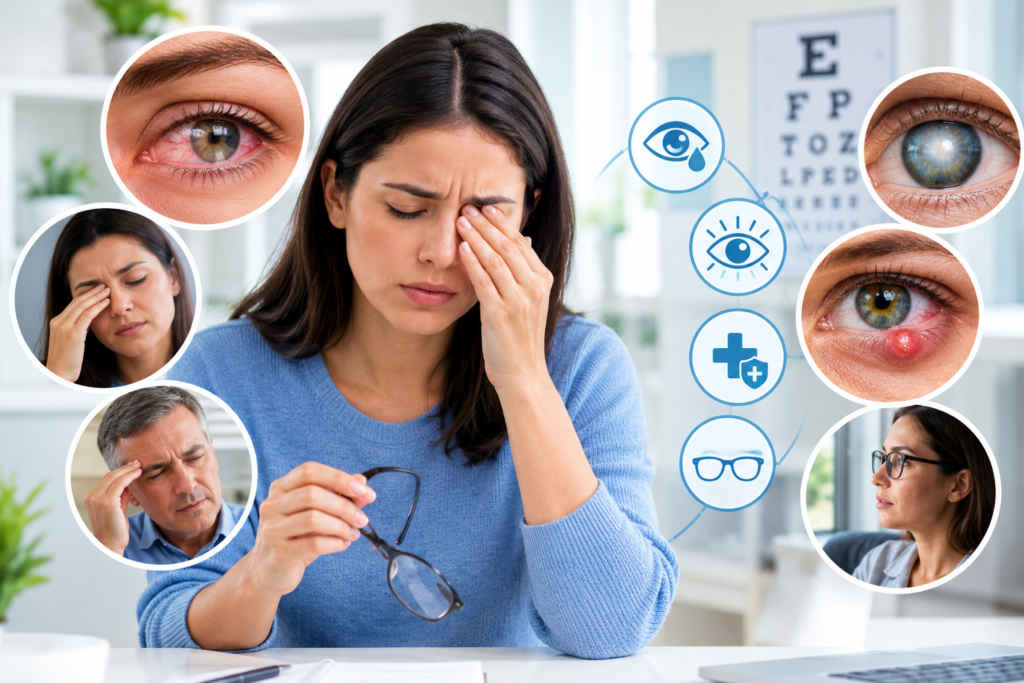
Prolonged screen use can contribute to digital eye strain, also known as computer vision syndrome. Common symptoms include tired eyes, dryness, headaches, blurred vision, and discomfort. These symptoms are usually temporary, but recurring problems should not simply be ignored.
What Is Screen Time Eye Strain?
Screen time eye strain refers to eye discomfort and visual symptoms associated with prolonged use of digital devices.
The American Optometric Association describes computer vision syndrome, also called digital eye strain, as a group of eye- and vision-related problems associated with prolonged use of computers, tablets, e-readers, and smartphones.
Unlike some eye diseases, digital eye strain generally does not mean that the screen is physically damaging the eye. Instead, prolonged close-up visual tasks can place demands on focusing and eye coordination, while concentrated screen viewing can reduce blinking and contribute to dryness.
Common symptoms include:
- Tired or aching eyes
- Dry or irritated eyes
- Blurred vision
- Headaches
- Difficulty refocusing
- Watery eyes
- Increased sensitivity to light
- Neck or shoulder discomfort
- A feeling of heaviness around the eyes
NIH notes that intense visual tasks, including prolonged screen use, can contribute to eye discomfort, with reduced blinking being one important factor.
Is There a Safe Amount of Screen Time for Your Eyes?
There is no universal adult screen-time limit specifically established to prevent digital eye strain.
Someone may experience discomfort after a few hours of uninterrupted computer work, while another person may tolerate longer periods with fewer symptoms. The American Optometric Association notes that symptoms are influenced by the amount of screen use as well as visual abilities and working conditions.
Therefore, instead of focusing only on a daily number, it is more useful to consider:
- How long you look at a screen without a break
- Whether you regularly blink
- How close the screen is to your face
- Screen brightness and glare
- Room lighting
- Your posture
- Font size and screen readability
- Whether you need updated glasses or contact lenses
- Whether you spend time outdoors and away from near-work activities
For many adults, the practical goal is not to eliminate screen use but to reduce prolonged uninterrupted viewing and make screen use more eye-friendly.
What Happens to Your Eyes During Long Screen Sessions?
You May Blink Less
One reason screens can contribute to discomfort is that people tend to blink less when concentrating on a digital task.
Blinking helps spread tears across the surface of the eye. Reduced blinking can contribute to dryness and irritation.
NIH specifically identifies reduced blinking during concentrated activities such as computer work as an important contributor to dry, uncomfortable eyes.
Your Eyes Keep Focusing at a Close Distance
Reading from a phone, tablet, or computer requires sustained near vision.
Extended close-up work can contribute to visual fatigue, especially when the screen is used for long periods without breaks.
Glare Can Increase Discomfort
Reflections from windows, overhead lights, or glossy screens can make it harder to see comfortably. Poor lighting and excessive contrast between the screen and surrounding environment may also contribute to symptoms.
Poor Vision Correction Can Make Symptoms Worse
Uncorrected refractive errors, including nearsightedness, farsightedness, and astigmatism, can contribute to visual discomfort during screen use.
If headaches or blurry vision continue despite improving your screen habits, an eye examination may be appropriate.
Digital Eye Strain: Common Symptoms to Watch For
Not everyone experiences the same symptoms.
Eye-related symptoms
You may notice:
- Dryness
- Burning
- Irritation
- Tired eyes
- Watery eyes
- Blurred vision
- Difficulty focusing
Head and body symptoms
Some people also develop:
- Headaches
- Neck pain
- Shoulder discomfort
- Back discomfort
These symptoms may be related to a combination of visual demands, posture, workstation setup, and prolonged sitting.
Most screen-related eye symptoms improve after stopping or reducing the activity that triggered them. Persistent or worsening symptoms deserve professional evaluation rather than being automatically attributed to screen use.
How to Reduce Screen Time Eye Strain
You do not necessarily need to stop using digital devices. Small changes can make prolonged screen work more comfortable.
1. Follow the 20-20-20 Rule
One of the simplest strategies is the 20-20-20 rule:
Every 20 minutes, look at something about 20 feet away for at least 20 seconds.
This gives your eyes a brief opportunity to relax from continuous near focusing.
The American Academy of Ophthalmology and NIH both recommend regular distance-viewing breaks as a practical way to reduce digital eye discomfort.
2. Remember to Blink
Consciously blinking more often can help maintain the tear film over the eye’s surface.
This can be especially useful during activities that require intense concentration.
3. Keep the Screen at a Comfortable Distance
For computer work, the screen should generally be positioned about an arm’s length away, with the screen slightly below eye level.
Avoid holding a phone extremely close to your face for extended periods.
4. Adjust Screen Brightness
Your screen should not appear dramatically brighter or darker than the surrounding environment.
Adjust brightness and contrast so that text is easy to read without forcing your eyes to work harder.
5. Reduce Glare
Try to position your monitor away from direct reflections from windows and strong lights.
A matte screen or appropriate screen positioning may reduce distracting reflections.
6. Increase Text Size
Small text can encourage you to move closer to the screen or squint.
Increasing font size can make reading more comfortable without requiring you to bring the device closer.
7. Maintain Good Posture
Your eyes are not the only part of your body affected by prolonged computer use.
Keep your back supported, shoulders relaxed, and screen positioned so that you do not have to repeatedly bend your neck forward.
8. Give Contact Lenses a Break When Appropriate
Contact lens wear can contribute to dryness for some people.
The American Academy of Ophthalmology suggests that people experiencing computer-related dryness may benefit from wearing glasses instead of contact lenses during prolonged computer use.
If contact lenses consistently cause discomfort, discuss it with an eye-care professional.
Does Screen Time Permanently Damage Your Eyes?
For adults, ordinary screen use has not been shown to permanently damage the eyes simply because a screen emits blue light.
The American Academy of Ophthalmology states that the amount of blue light coming from computer screens has not been shown to cause eye disease. Digital eye discomfort is more closely associated with prolonged or inappropriate device use than with blue light itself.
That does not mean unlimited screen use is ideal.
Long periods of screen use can contribute to temporary discomfort, sleep disruption when devices are used late at night, reduced physical activity, and other concerns depending on how screens are incorporated into daily life.
Do Blue-Light Glasses Prevent Digital Eye Strain?
Blue-light-blocking glasses are widely marketed for computer users, but they should not be presented as a proven solution for digital eye strain.
The American Academy of Ophthalmology does not recommend special blue-light-blocking eyewear specifically for computer use because evidence has not established that these glasses prevent digital eye strain.
If screen use late at night affects sleep, reducing evening screen exposure and using device settings that reduce brightness may be more practical approaches.
What About Screen Time and Children’s Eyes?
Children deserve special consideration because their visual systems are still developing.
There is increasing research examining the relationship between digital screen exposure, near work, outdoor time, and myopia (nearsightedness).
A recent systematic review and dose-response meta-analysis found an association between greater digital screen exposure and higher odds of myopia, although the researchers rated the overall certainty of evidence as low and the studies showed substantial variability.
Other research has also found an association between higher screen exposure and myopia in children and adolescents. However, screen time does not exist in isolation: near work, outdoor activity, genetics, and other environmental factors can also influence myopia risk.
Encourage Breaks and Outdoor Time
Children can benefit from regular breaks from close-up screen activities and opportunities to spend time outdoors.
NIH notes that spending time outdoors and focusing at greater distances may be helpful for children’s visual health.
Parents should also pay attention to signs such as:
- Squinting
- Sitting unusually close to screens
- Frequent headaches
- Complaints of blurry distance vision
- Rubbing the eyes frequently
- Difficulty seeing classroom boards
- Avoiding visually demanding activities
An eye examination can help determine whether these symptoms are related to refractive error, myopia, dry eye, or another condition.
Screen Time Recommendations for Different Situations
Rather than using one rigid number for everyone, consider the purpose and pattern of screen use.
| Situation | Practical eye-health approach |
| Office computer work | Take frequent distance-viewing breaks and optimize screen position |
| Schoolwork | Alternate near work with breaks and encourage outdoor activities |
| Smartphone use | Avoid holding the phone extremely close and take regular breaks |
| Gaming | Break up long sessions and maintain an appropriate viewing distance |
| Evening screen use | Reduce prolonged exposure close to bedtime if it interferes with sleep |
| Children | Balance screen activities with outdoor play, physical activity, sleep, and other age-appropriate activities |
The key principle is not simply counting every minute on a screen. It is creating healthier patterns around digital-device use.
When Should You See an Eye Doctor?
Occasional tired eyes after a long workday are common. However, persistent symptoms should not automatically be blamed on screen time.
Consider arranging an eye examination if you experience:
- Persistent blurred vision
- Frequent or recurring headaches during visual tasks
- Ongoing eye pain
- Persistent dryness or irritation
- Difficulty seeing clearly at distance
- Double vision
- Symptoms that continue after reducing screen use
- A noticeable change in vision
- Increasing difficulty reading or focusing
Seek urgent medical attention for sudden vision loss, severe eye pain, significant eye injury, or sudden major changes in vision.
An eye-care professional can determine whether symptoms are related to digital eye strain, an uncorrected refractive error, dry eye, or another eye condition.
A Simple Daily Screen-Eye Routine
For people who use screens frequently, a simple routine can help:
Every 20 minutes: Look into the distance for at least 20 seconds.
Throughout the day: Blink regularly and avoid staring continuously.
During computer work: Keep the monitor about an arm’s length away and slightly below eye level.
During breaks: Stand up, move around, and shift your visual focus away from close work.
For children: Balance screen activities with outdoor time, physical activity, sleep, and other activities appropriate for their age.
When symptoms persist: Arrange an eye examination rather than assuming that screen time is the only cause.
Frequently Asked Questions About Screen Time Eye Strain
1. How much screen time is too much for your eyes?
There is no single daily limit that applies to every adult. Prolonged uninterrupted screen use is more relevant to digital eye strain than a specific total number of hours. Taking regular breaks, maintaining an appropriate viewing distance, and optimizing lighting can help reduce discomfort.
2. Can too much screen time damage your eyes?
Ordinary screen use has not been shown to permanently damage adult eyes simply because of screen light. However, prolonged use can cause temporary digital eye strain symptoms such as dryness, fatigue, headaches, and blurred vision.
3. What is the 20-20-20 rule?
The 20-20-20 rule means that every 20 minutes, you look at something about 20 feet away for at least 20 seconds. It is a simple strategy for interrupting prolonged near-screen work.
4. Does screen time cause myopia in children?
Research has found an association between greater digital screen exposure and myopia in children and adolescents, but the relationship is complex. Near work, outdoor time, genetics, and other factors may also contribute. Current evidence does not establish that screen time alone is the sole cause of myopia.
5. Are blue-light glasses necessary for computer use?
Current evidence does not establish that special blue-light-blocking glasses prevent digital eye strain. The American Academy of Ophthalmology does not recommend them specifically for computer use.
6. Why do my eyes feel dry when I use my phone or computer?
Concentrating on a screen can reduce blinking. Less frequent blinking can interfere with the normal tear film and contribute to dryness and discomfort.
7. When should I get my eyes checked?
If blurred vision, eye pain, headaches, dryness, double vision, or other visual symptoms persist or interfere with everyday activities, an eye-care professional can determine whether there is an underlying vision or eye problem that needs attention.
Conclusion
Screen time eye strain is common among people who spend long periods using computers, smartphones, tablets, and other digital devices. The most useful approach is not to focus on one universal daily screen-time number but to reduce prolonged uninterrupted viewing and improve how screens are used.
Regular distance-viewing breaks, frequent blinking, appropriate screen positioning, comfortable lighting, readable text, and good posture can all help reduce digital eye strain. For children, balancing screen activities with outdoor time and other activities is also important because research continues to examine the relationship between digital exposure and myopia.
If eye discomfort or vision changes persist despite improving your screen habits, an eye-care professional should evaluate the symptoms rather than assuming they are simply caused by screen time eye strain.